Know what's working. Do more of it.
Terminal studies your own trades and shows you, in plain dollars, which setups pay you and where you can get better.
Private beta: request access and we will email you an invite.
See what it does for you.
Ten short sketches of what Terminal does, drawn for this page on sample numbers. They take turns; pick one to watch it.
Drawn on sample numbers, not a real account. To see the real app, open See it in action further down.
Do more of what works.
Every trade is sorted into what helps you and what holds you back. Each comes with a dollar figure, so you know where to focus next.
- LEAKRule breaks cost you · 69 trades−$97,006
- EDGE“Trend continuation” is your best edge · 46 trades+$42,584
- EDGESetup “Reversal” pays · 51 trades+$24,666
- LEAK“FOMO entry” is your costliest habit · 7 trades−$19,448
- LEAKWhen you hesitate, results suffer · 6 trades−$18,347
- EDGEYour “swing” trades are a real edge · 49 trades+$15,918
- LEAKSetup “Range fade” loses money · 37 trades−$15,689
These results are based on simulated or hypothetical performance results that have certain inherent limitations. Unlike the results shown in an actual performance record, these results do not represent actual trading. Also, because these trades have not actually been executed, these results may have under-or over-compensated for the impact, if any, of certain market factors, such as lack of liquidity. Simulated or hypothetical trading programs in general are also subject to the fact that they are designed with the benefit of hindsight. No representation is being made that any account will or is likely to achieve profits or losses similar to these being shown.
Every trade you take is a lesson. Terminal makes sure you keep it.
Find what pays.
Every setup, ranked by the dollars it actually made you. Not how it felt.
Find what's costing you.
The early entries. The losers held too long. Shown plainly, with a dollar figure, so you can change them.
See the rough patch coming.
Your own record, run forward, so you can plan for a bad stretch before it comes.
What could one better habit be worth?
Pick a habit and move the sliders to match your trading. Small fixes add up faster than they look.
- HABITHolding a loser past the stop$2,250 a month
One habit, at your numbers. Terminal finds which one is yours, from your own trades.
An illustration of your own inputs, not a promise of results. Worked out in this page; nothing you move here is sent anywhere.
Twelve answers about your own trading.
Every one of them runs on your own trades, the moment they're in.
Your edge
Which plays pay you, in dollars.
Your leaks
The habit that costs you, priced.
The drawdown ahead
The bad stretch, before it comes.
Every market, one screen
Stocks to crypto, side by side.
Options, without the guesswork
What it can make and lose, before you send.
The news that moves your names
Only what moves what you hold, and a red headline the minute CPI, jobs or the Fed is out.
The company behind the ticker
Filings, insiders, numbers. One keystroke.
Strategies that come back graded
A straight answer before real money.
A risk desk that has your back
Your limits, held when you don't.
A journal that remembers
Every trade and why you took it.
Any currency, any venue
Anywhere you trade, one book.
Private by design
Encrypted end to end when you set a passphrase.
One seat instead of a stack of subscriptions.
Your broker holds the money. Terminal holds the edge. Many traders pay for half a dozen tools that watch the market and never talk to each other. In Terminal every part reads the same book, so it can watch the trader too.
| What you need | In Terminal | The usual way |
|---|---|---|
| Charts for every market | Included | A charting app |
| A trade journal | Included | A journal app or a notebook |
| Portfolio tracking across accounts | Included | A spreadsheet |
| Analytics on your own trades | Included | Usually nothing |
| Risk limits held for you | Included | Willpower |
| Strategy testing, graded | Included | A separate backtester |
| News, filings and research | Included | A news service |
| Paper trading under your real rules | Included | A broker demo |
Your whole trading day, in one window.
Charting, a trade journal, portfolio tracking, risk tools, news and research, in one window and built around your own trades.
Your trading diary, kept for you.
Load a statement and every trade is in. Add why you took it, a screenshot and how you felt, then review the day in minutes.
- Every trade in, tagged and searchable
- Daily review, goals and notes
- Tax-ready at year end
Every position, always current.
Stocks, options, futures and crypto in one book, in your own currency, with the profit and loss on each.
- One row per option contract
- Every account in one view
- Open risk at a glance
Your numbers, finally explained.
A trader rating, the Edge Finder, and your results by setup, hour and day, so you can see exactly what works for you.
- Trader rating, graded on process
- The Edge Finder, ranked in dollars
- Results by setup, hour and day
Stay in the game.
Your loss limits held for you, the bad stretch seen in advance, and the right size worked out before you click.
- Daily loss limits you set
- Position sizing
- Drawdown and stress tests on your own record
Your whole desk on one screen.
Charts, quotes, news and your book side by side, arranged the way you trade, and open as fast as you can ask for them.
- Anything a few keys away
- Windows you arrange and keep
- Built for speed
Test it before you trust it.
Build a strategy from blocks, run it on history, and get a plain grade on whether it holds up. Tested results are hypothetical, with the limits set out under the Edge Finder.
- Backtests graded A to F
- Stress tests that look for luck
- No code needed
Every market, live.
Charts for stocks, options, futures, bonds, currencies, crypto and event markets.
The news and the filings.
Headlines, company filings, insider moves, calendars and screeners, a keystroke away.
Practice with no risk.
Trade the live market with practice money, under the same rules you set for real.
Your broker, connected. Your journal, live. In approval
When your broker approves the connection, your fills arrive the moment they happen. No statement to load, no trade to type. Connections to many brokers are built and waiting on each broker's approval. Not available yet.
From a statement to answers.
On the left, what your broker gives you: rows of fills. On the right, the same trades in Terminal, with the result, the grade and the setup on every one.
Drag across to compare. The fills on the left are the sample book's, the way a broker prints them.
Whatever you trade, it fits how you trade.
Terminal reads stocks, options, futures, currencies and crypto, and every view works on your own record.
Day traders
See which hours and setups pay you, and keep a daily loss limit that holds.
Swing traders
Every position in one place, and how long your winners and losers really last.
Options traders
One row per contract, spreads kept as one trade, and the payoff before you send it.
Futures traders
The right contract sizes, and the year-end tax treatment handled for you.
Funded-account traders
Run your own record through a funded challenge's rules before you pay for one.
Up and running in three steps.
No install and no card. Your first answers come as soon as your trades are in.
Request access
Leave your email. Invites go out in small groups, and your invite email finishes setup. Your book is end-to-end encrypted when you set a passphrase.
Load your trades
Paste or upload your broker's statement. Stocks, options, futures, forex and crypto all come in.
See what's working
Your trader rating, your best setups and what to fix next, in plain dollars.
At your desk, or in your pocket.
Terminal runs in your browser on any computer, and adds to your phone's home screen like an app. Your book follows you when you sign in.
And the whole trading desk around it.
The analysis is why you come. The rest is why you stay. To see the real app, open See it in action below: screenshots, on the sample book that ships with it.
Know the trade before you place it
Build any position and see exactly what it can make and lose. It lands in your book the way you think of it.
One volatility score, and everything agrees with it
One score for how unusual the market is right now, and the size it suggests for your next trade. The chart studies ship with the app and run the same engine as Terminal, so the number on your chart and the number sizing your trade are the same number. Every trade keeps the score it was taken on, so your journal can show whether sizing down actually helped.
Ships with Vol Profile, the volatility score and the stops that read it. Keep your own scripts too, and share them by link once you sign in.
See it in action Each part of the app, drawn, then three screenshots of the real thing
Screenshots of the real app. Open one to see it full size.
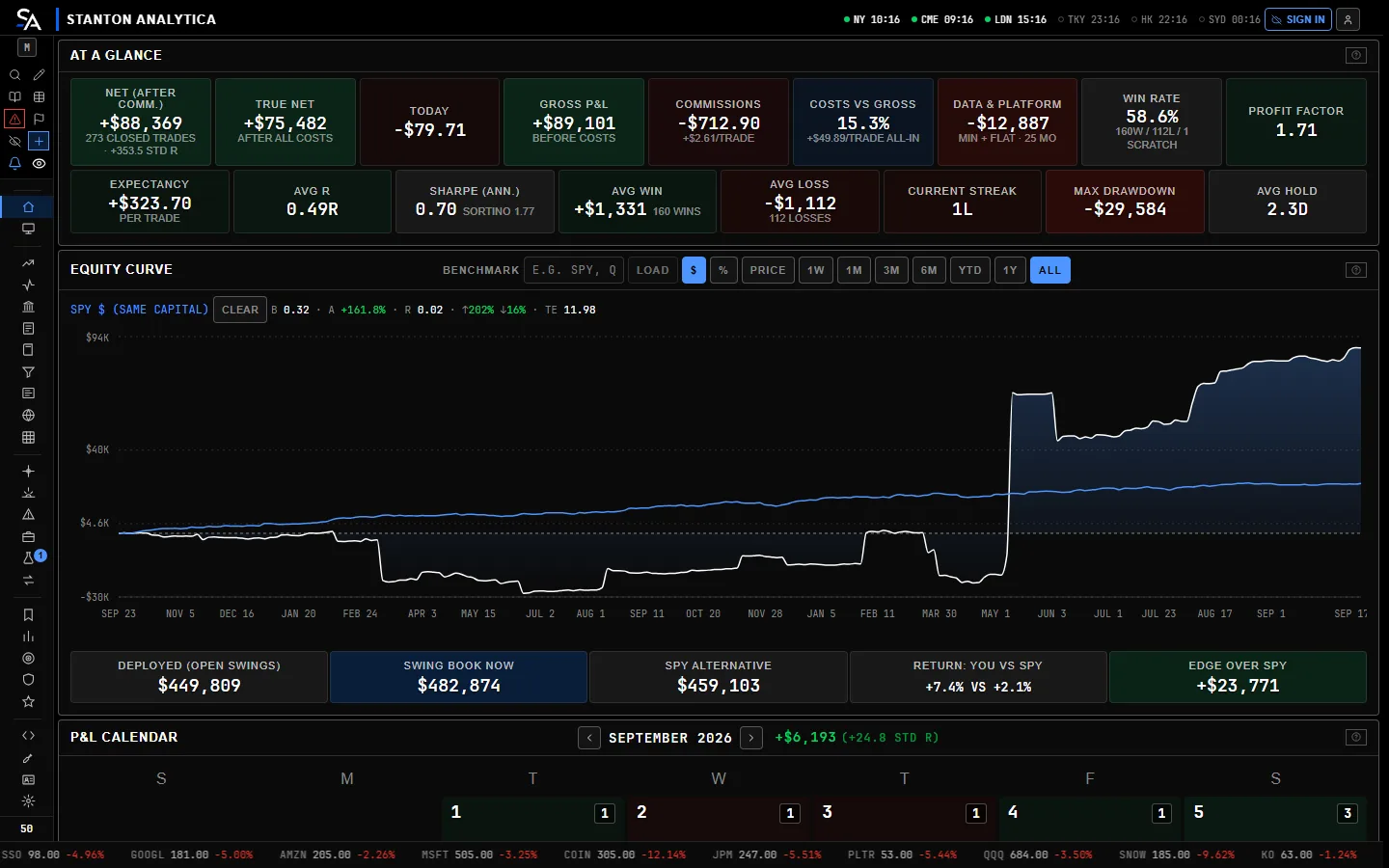
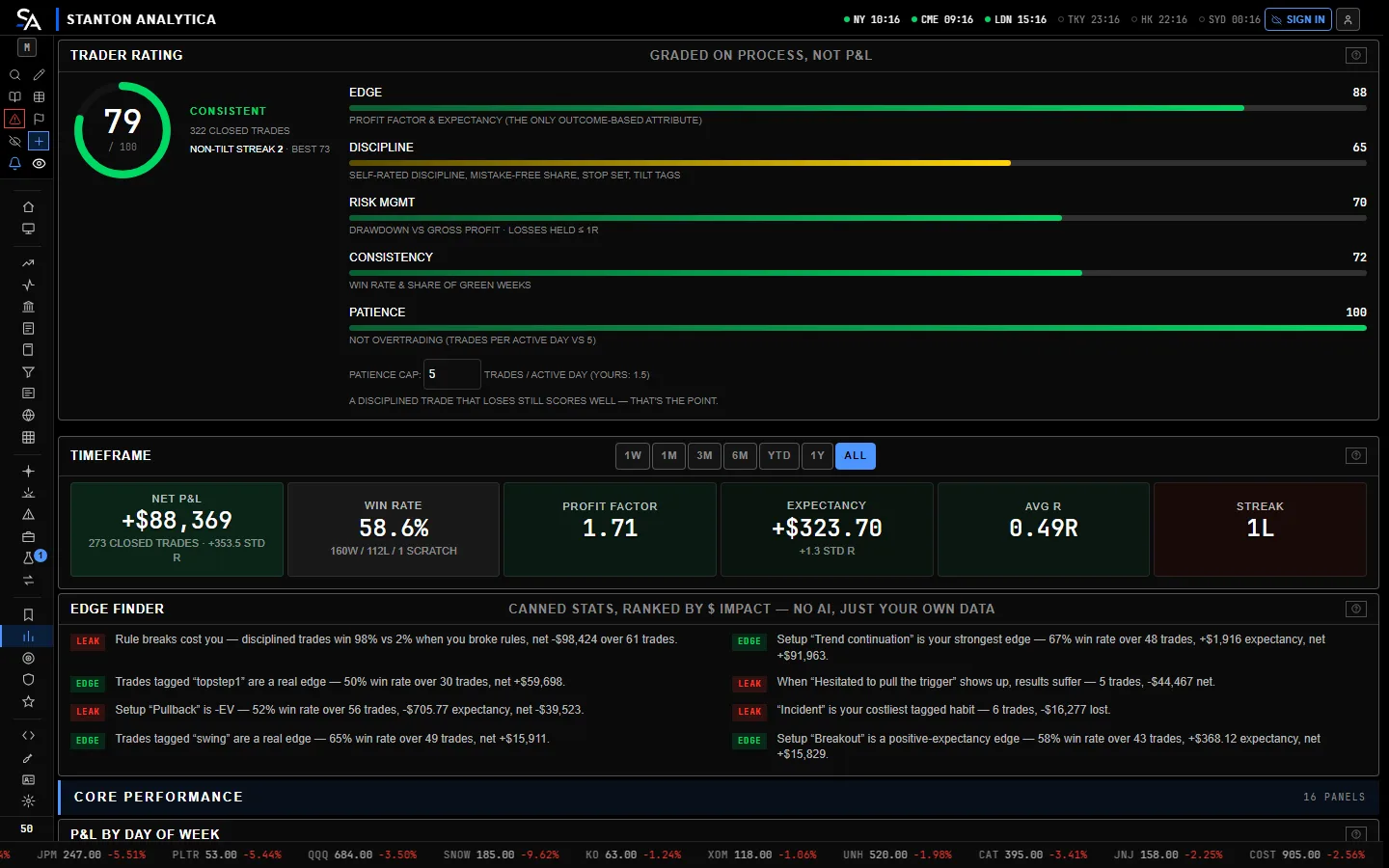
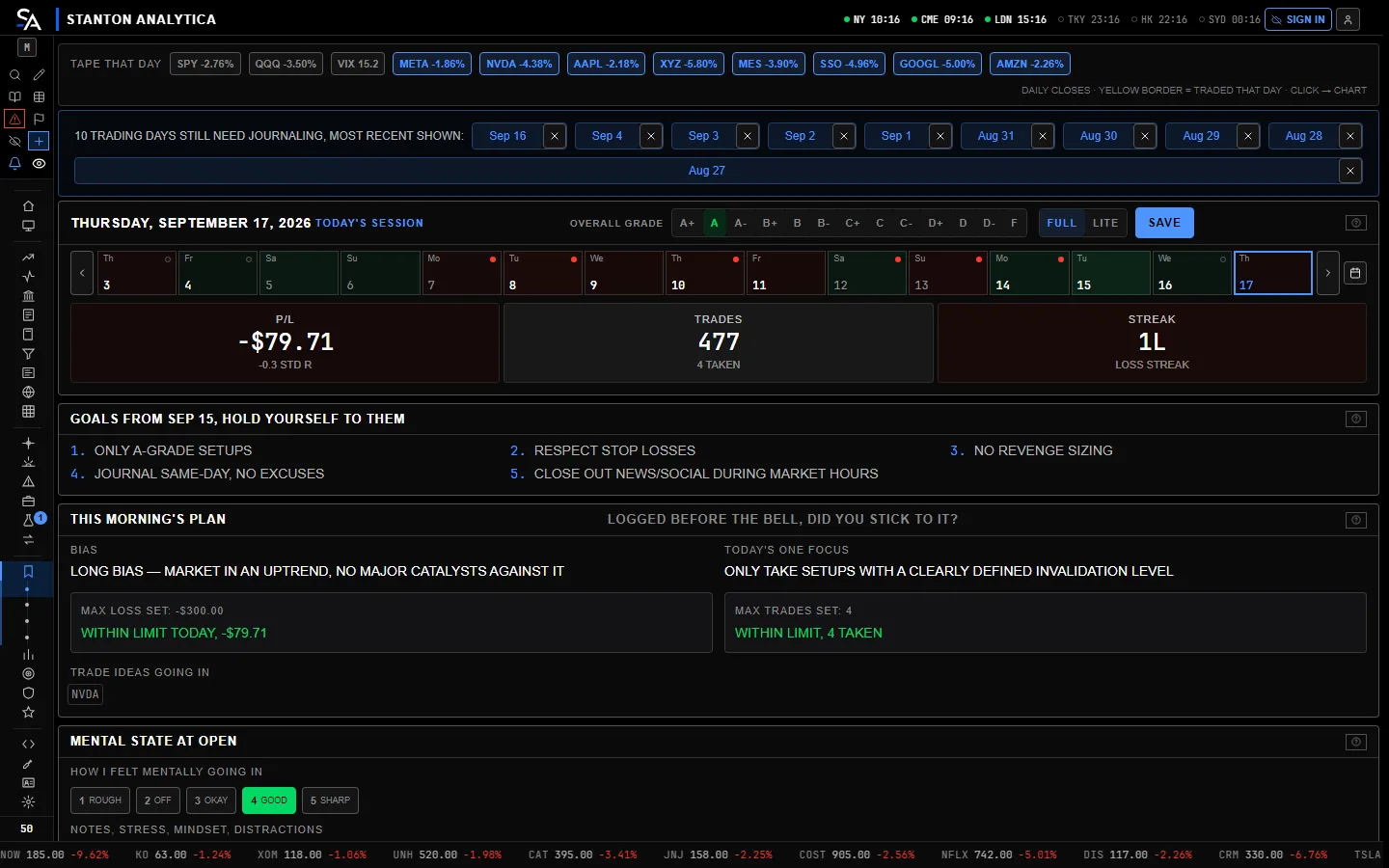
Your trades are yours.
Four rules the product is built on, and they do not change.
- 01We grade process, not luck.
- 02Encrypted end to end when you set a passphrase. Without one, we tell you.
- 03Export everything, any time. Leaving costs you nothing.
- 04One seat does the whole job.
How your account is kept safe
- 01Your book travels over an encrypted connection and is kept under your account, end-to-end encrypted when you set a passphrase. No other account can read it.
- 02Want it private even from us? Set a passphrase and your book is encrypted end to end, in your browser, before it leaves.
- 03Two-factor sign-in with an authenticator app.
- 04Our servers turn away suspicious requests and watch for break-in attempts.
Built by a trader, for traders.
I'm Tate, and I've been trading Wall Street since the day I was old enough to open an account. One thing I've learned: you can't improve what you can't see.
Trading is a business. Run it like one.
I built Terminal for my own trading first. Now it's yours.
Stop guessing. Start proving.
— Tate Olsen
One desk. Free while it's in beta.
Trader for the journal and analytics, Pro for the full terminal with advanced analytics and risk tools, Desk for the professional workflow. Every plan is free during the beta; pricing is announced at launch.
Everything in Pro, free while Terminal is in beta.
- Everything in Pro
- No card, nothing to cancel
- Your feedback shapes what ships next
The whole terminal: journal, analytics, risk and charts.
- Unlimited trade journal
- Trade tagging
- Performance and journal analytics
- Risk management
- Advanced charts and visualizations
- Custom reports and filtering
- Rules and playbook tracking
- Live prices through your own broker
Everything, plus the professional workflow.
- Everything in Trader
- Multiple accounts
- Advanced market tools
- Advanced alerts
- API and export
- Priority support
- Live prices from Stanton when they launch
Paid plans open after the beta. Everything above is free to every beta account today, and nothing takes a card.
Cancel whenever you like once paid plans open, and export your book any time.
Got an invite or promo code? Enter the code when you finish setting up from your invite email.
Before you request access.
My broker already gives me reports.
Reports tell you what happened. Terminal tells you why, and what it cost you.
I already journal in a spreadsheet.
A spreadsheet only holds what you type into it. It never tells you anything back.
I don't trade enough for this.
Ten trades are enough to spot a habit. Fifty are enough to put a price on it.
I'm already profitable.
Then see which setups carry your results and where the rest leak. Profitable traders have leaks too.
Does it work with my broker?
Most likely: if your broker can export your trades or let you copy them, they come in. Stocks, options, futures, forex and crypto.
Where is my data?
Under your account. Your book follows you to every device you sign in on, encrypted end to end when you set a passphrase.
Can I leave?
Any time. Export your whole book from the Accounts tab and take it with you.
Is this investment advice?
No. Terminal works out the numbers in your own trades. It never tells you what to buy, sell or hold.
What happens when the beta ends?
Your book stays in your account, and you can export it any time. Paid plans open then, and nothing is charged unless you choose one.
How do I delete my account?
Write to us and we delete it, with the copy of your book on our server. Export your book first if you want to keep it.
Learn something from every trade you take.
Request access
Terminal is in private beta. Leave your email and we will send you an invite as seats open.
You're on the list
Thanks. We saved your request for your address.
- We review requests. Terminal is in private beta, so access is by invite.
- Invites go out in small groups. Each group helps shape what ships next.
- Your email has a link to finish setting up. Choose a username and a password, and you're in.
No spam. One email when your invite is ready.
Back to the home pageCheck your email
Thanks — your account is created. We sent a confirmation link to your address.
- Open the link in that email. It confirms the address and opens Terminal signed in.
- Nothing there after a few minutes? Check spam or promotions, then sign in — an unconfirmed address is told so.
- Your promo code is kept, and applied the first time Terminal opens signed in.
Privacy
The short version. Terminal runs in your browser. When you sign in, your trades, journal and settings are synced to our server under your account, so your book follows you to every device you sign in on. That copy is end-to-end encrypted when you set a passphrase, and stored in plain text without one. We count visits to the public pages with Vercel Web Analytics. It sets no cookies, keeps no personal data and cannot tell who you are. The app itself is never counted. We take no payments yet.
What is stored, and where
Terminal is a single page that runs in your browser. Everything you enter — trades, positions, journal entries, session reviews, goals, risk caps, settings and layout — is written to your browser's IndexedDB storage on the device you are using while you work and, once you sign in, synced to your account (see Cloud sync below). It stays until you delete it.
Seconds and tick charts are built from the market trades the app hears while it is open. Those trades are kept in a separate IndexedDB store on your device for five days, so the chart has history; they are market data, not anything you entered, and they are never uploaded.
Without an account we hold nothing about you beyond an email you leave with us (below). During the private beta an account starts from an invite; sign-in is handled by Supabase Auth on our project: we hold your email address, the username you pick (a display name, which you can change on the Accounts tab), a salted password hash and the date of the terms you accepted, and, if you turn on two-factor sign-in, your authenticator app's setup, kept by our sign-in provider. Nothing else — no real name, no card. Sign-in scopes your synced copy to you.
If you leave your email for launch notes, or to request access during the private beta, we keep that address, which of the two you asked for, what you trade if you told us, and the day you left it, in a table only we can read, only to send launch notes or your invite. Nothing else is kept with it and it is never shared; write to us (Contact) and we take it off.
What leaves your device
Only the things listed here can, and each is either explicit or narrow. Several of them exist only if you switch them on, and the ones at the end of the list are doors you have to open yourself — a Terminal nobody configures talks to market-data sources and nothing else. This list is meant to be complete: if you find a request it does not cover, that is a bug in this page and we want to hear about it.
-
Market data requests. To draw a chart or price a position,
the app fetches from public third-party sources (for example Yahoo Finance,
Stooq, the SEC, FRED and, if you supply keys, Finnhub or marketdata.app).
Those requests carry a ticker symbol and a date range — never
your positions, sizes, P&L or journal. (True of market-data requests. The
AI-assist flow below is the exception, which is why it is spelled out
separately rather than folded in here.)
Market data is always on — there is no switch to turn it off. The
requests carry a ticker symbol, not your book. Some are routed through public CORS
proxies, which see the same ticker-level request. Option chains are
routed through a relay (
/api/chain): it sees the same ticker-level request and forwards it upstream. On our hosted site that relay is our server, not a third party’s and not yours — so we see the ticker and the date range, the same as any other market-data request on this list. - Cloud sync — on when you sign in. Once you are signed in on our site, your book is mirrored to our database (a Supabase Postgres project) under your account, so a new device can restore it. If you set a passphrase it is end-to-end encrypted in your browser first (PBKDF2-SHA256 → AES-256-GCM), and the server stores a single opaque blob it cannot read. The passphrase is held in your browser's memory for the session only — never written to your device, never sent anywhere — so you enter it once per session. Without a passphrase the copy is stored in plain text on our server — so set one. Screenshots stay on your device either way, unless you attach one to an AI Coach question (below).
- The AI Coach — off unless you set it up, and it DOES send a summary of your journal. This is the one outbound flow that carries your own trading data, so it is described in full. The Coach runs on a model you host, in Ollama or LM Studio. When you ask it for a report or a question, the app builds a journal digest — a summary derived from your trades, including what you hold now — and sends it, with your question and, where you attach one, a chart screenshot, to the address you configured. That address is on your own machine by default, and then nothing leaves it; if you point it at another computer, the digest goes there. Terminal holds no AI key and connects to no hosted AI service (the optional Anthropic key and the screenshot importer were removed on 25 September 2026). Stanton AI's other answers and Ask the Journal are worked out in your browser from your own data. When the search box or Stanton AI cannot match your wording by its rules, a small reader that Stanton serves from its own site (all-MiniLM-L6-v2) works out which question you meant, on your computer: it compares your words with the app's own, nothing you type is sent anywhere, nothing from your journal is turned into data for it, and the Plain words setting in Settings › Navigation switches it off. No Coach request is ever made unless you have set up a runner and asked. The digest is assembled in your browser at the moment you ask; it is not stored or sent anywhere else.
- Optional integrations you enable. Web Push alerts only operate after you switch them on. Push stores a browser-issued subscription token and the price levels you set, so a scheduled job can notify you; it never receives your trades.
- A security watch at our server's doors. When our server turns a request away (a sign-in that does not check out, a request that is not allowed, too many requests from one place), it keeps a short record so the owner can spot someone trying to break in: the time, which part of the server, the country your connection reports, the account id the request claimed, and a scrambled tag made from your address that cannot be turned back into it. It never records your address itself, your email, a password, a sign-in token or anything in your journal. The records are deleted after 30 days, and only the owner can see them.
-
Doors you open yourself, and what each one sees. These are off until
you use them, and every one of them is listed here because it leaves the device:
- Live quotes through our keys (
/api/keys,/api/relay,/api/stream) — when you use our market-data keys rather than your own, the request goes through our server, which sees the ticker, the date range and your Stanton sign-in (our paid feeds answer only a signed-in member)./api/keysanswers only whether a key exists, never its value. - Connecting a broker (
/api/relay) — some brokers, such as Schwab, TradeStation, E*TRADE, Coinbase, Kraken and Robinhood, refuse a request straight from a browser or need it signed on a server, so your sign-in and your orders with them pass through our server on the way to the broker. It forwards them and keeps nothing: no sign-in, key or token is saved, logged or cached, and a test stops our build if that ever changes. Brokers that accept a browser, such as Alpaca and Tradier, are reached straight from your device. - A promo code (
/api/promo) — the code and your account id, so it can be redeemed once. - An incoming webhook (
/api/hook) — a URL you create so an outside charting or alert tool can post a trade line to your book. Anything sent to it passes through our server on its way to you. - Phone as remote (
/api/remote) — pairs a phone to a desk session so it can drive it; the pairing and the commands pass through our server. - Sharing you turn on — team chat rooms, a public profile, an open position shared by a link, and Your most looked up (the symbols searched most across users). Each is off until you switch it on, and says what it shares before it does.
- The Bridge's journal link — if you run Stanton Bridge on your computer and link it, it signs in to your account from that computer and reads your journal, the same way the app does.
- Live quotes through our keys (
API keys you paste in
Keys for market-data providers are kept in your browser's local storage and are sent only to the provider they belong to. They are never routed through a proxy or relay, and never to us. They are never written into a backup export, encrypted or not — a backup carries your book, not your credentials.
Cookies and tracking
Terminal sets no cookies and includes no advertising, fingerprinting or session-replay code. We count visits to the public pages with Vercel Web Analytics. It sets no cookies, keeps no personal data and cannot tell who you are. The app itself is never counted. The app uses browser storage purely to hold your own data and your sign-in in your browser. One exception, only when you sign in or create an account: the sign-in form may run a Cloudflare Turnstile check (a bot check, usually invisible), which means Cloudflare sees that request. Apart from the chart widget named above and Cloudflare's check on the sign-in form, nothing else loads a third-party script.
We do not sell or share your personal information. Nothing on Terminal tracks you across other sites, so Do Not Track and Global Privacy Control have nothing to turn off.
Exporting and deleting
- Export: Accounts → Backup & Restore writes a JSON file of everything. An encrypted export (AES-256-GCM, passphrase-derived) is also available.
- Delete: clearing this site's browser data removes your book from that device. If you have an account, Accounts → Account → Delete my account deletes your sign-in and the synced copy of every book in one step, after offering you an export. Messages you sent into other people's chats stay in those chats; write to the contact below to have them removed too, or if you cannot sign in.
Please keep your own backups. With a passphrase set we cannot read your synced copy, so we cannot recover a book whose passphrase is lost.
If you live in the EU, the UK or elsewhere outside the US
Terminal is open to traders everywhere. If you live in the European Union, the European Economic Area or the United Kingdom, data-protection law (the GDPR and the UK GDPR) gives you the rights below. We give the same rights to everyone, wherever you live.
Who is responsible. Stanton Analytica decides what is kept and why. Write to tate@stantonanalytica.com about anything on this page.
Why we keep what we keep.
- Your account and your synced book: to provide the service you signed up for.
- An email you leave for launch notes or an invite: because you asked us to. Ask, and we take it off.
- The security watch at our server's doors: to keep the service and your account safe. It holds no address, email or journal, and it is deleted after 30 days.
Your rights. You can ask to see a copy of what we hold about you, to correct it or delete it, or to have it in a file you can take elsewhere. The export on the Accounts tab already gives you your whole book. You can also object to or limit how we use it, and withdraw your consent at any time. Write to the address above and we answer within one month. You can also complain to the data-protection authority where you live (in the UK, the ICO).
Where it is stored. Your account and synced book are stored in the United States, in a Supabase database in Oregon. If you live outside the US, using Terminal means your data goes there. These companies handle it for us, all in the US, and only to run Terminal:
- Supabase: the database and sign-in.
- Vercel: hosting our pages and our server.
- Resend: sending our emails.
- Cloudflare: the bot check at sign-in.
Children
Terminal is a tool for adults (18 or older, as the terms require) managing their own trading records and is not directed at children.
Changes
If this policy changes, the date at the top changes with it. Material changes to what leaves your browser will be called out in the app.
Contact
Questions or a security report: tate@stantonanalytica.com. Security contact details are also published at /.well-known/security.txt.
Terms of service
The short version. Terminal is analysis software for your own trading records. Nothing here takes payment today. Terminal is in beta, every feature is free to every beta account, and there is nowhere to enter a card. Paid plans are described below as what they will be, and section 4 says which of those terms only start to apply on the day they open. It is a tool, not advice: every number it shows is computed from what you entered and what public sources answered, and it can be wrong. Your data stays yours.
1. Who these terms are between
These terms are an agreement between you and Stanton Analytica ("we", "us"), the maker of Terminal ("Terminal", "the service"). By creating an account, paying for a plan, or using Terminal, you agree to them. If you do not agree, do not use the service.
You must be at least 18 years old, or the age of majority where you live, to create an account or buy a plan.
2. What the service is
Terminal is a browser application: a trading journal, analytics, a risk engine, charts, options tools, research panels and a command-line desk. It runs in your browser. When you sign in, it syncs your records to our servers under your account so they follow you to every device you sign in on (end-to-end encrypted when you set a passphrase), and it relays market data and push notifications on your behalf.
Terminal does not connect to a brokerage, hold funds, place or execute orders, or move money. Nothing you do in it buys or sells anything.
Built with AI assistance. Parts of Terminal were written with the help of AI coding tools. Every change is reviewed by a person and has to pass an automated test suite before it is released. This changes nothing about your rights under these terms or about our responsibility for the software — it is written down because you are entitled to know how the thing you rely on was made.
3. Your account
- You are responsible for the email address and password you sign in with and for everything done under your account. Tell us at once if you think it has been used without your permission.
- If you set an encryption passphrase, we cannot recover it. A forgotten passphrase means the cloud copy of your book cannot be read by anyone, including us. The copy on your own device is unaffected.
- One person per account. Accounts inside Terminal (separate books for live, funded, or backtest trading) all belong to that one sign-in.
4. Plans, billing and refunds
None of this is in effect yet. Terminal is in beta. There is no way to pay us, no card is stored anywhere, and every account has every feature. The plans below are what we intend to charge for when paid plans open; the terms under “When paid plans open” start applying to you on the day you first choose a paid plan, and not before. If they change before then, the version you agree to at that moment is the one that binds us.
The plans we intend to offer
| Plan | Price | What it includes |
|---|---|---|
| Beta | Free during the beta | Everything in Pro, free while Terminal is in beta. |
| Trader | Announced before paid plans open | The whole terminal: journal, analytics, risk and charts. |
| Pro | Announced before paid plans open | Everything, plus the professional workflow. |
There is no free plan once the beta ends. During the beta every account has all of it, at no cost, whichever row above it would otherwise sit in.
When paid plans open
- Billing. Prices are in US dollars. A monthly plan would be charged every month and a yearly plan every year, on the date you subscribed, until you cancel. Taxes may be added where the law requires it.
- Cancelling. You would be able to cancel at any time. Cancelling stops the next charge; you keep the paid features until the end of the period you have already paid for, and then your account has no paid plan. Your records stay yours either way, and you can still export them.
- Refunds. If you cancel within 14 days of your first payment, email us and we will refund that payment in full. After that, and for renewals, payments are not refunded for the unused part of a period, except where the law where you live says otherwise.
- Price changes. If we change a plan's price, we will tell you by email at least 30 days before it applies to you. Continuing to use the plan after that date means you accept the new price.
- Payments would be processed by a third-party payment provider, and we would not see or store your full card number. We have not signed up with one yet, and no payment provider is connected to Terminal today.
5. What Terminal is not
Not financial advice. Terminal is a record-keeping and analysis tool. Nothing in it is a recommendation to buy, sell or hold anything, and nothing in it is tax, legal or investment advice. Grades, verdicts, risk figures, simulations and projections are calculations over your own past trades and over data from public sources; they describe the past and cannot predict the future. Trading involves the risk of loss, and decisions you make are yours alone. It is general and impersonal: nothing in it is tailored to any one person's circumstances or goals. Backtests, stress tests and Monte Carlo runs are hypothetical: they were not achieved by real trading, and past results, real or hypothetical, are not indicative of future results.
The tax exports (such as Form 8949 figures) are computed from what you logged, follow general rules, and are not a substitute for a tax professional or your broker's official statements.
The AI features are not advice either, and they can be wrong. Terminal includes an optional AI Coach, off until you set it up. It runs on a model you host (Ollama or LM Studio), on your own machine unless you point it elsewhere; we hold no AI key and see nothing that passes through it. Stanton AI and Ask the Journal answer from your own data; the small reader they and the search box use, on your computer, only works out which question you meant and never writes a number. What the Coach gives back is generated text, and what any of them gives back can be incomplete, out of date, or simply wrong — including when it summarises your own trades or reads a chart screenshot you attach. Check anything you intend to act on against your broker's own records before you act on it. Nothing produced by an AI feature is a recommendation, and none of it is advice.
6. Your data
How your data is stored, what leaves your device and when is set out in the privacy policy, which is part of these terms. In short: your records are yours; when you sign in they are synced to our servers so they follow you to every device you sign in on; that copy is end-to-end encrypted when you set a passphrase; and you can export everything at any time, and we delete your account when you ask.
You grant us only the permission needed to run the service: to store the copy you send (encrypted when you set a passphrase), to relay it back to your devices, and to send you the notifications you set up.
If you send us ideas or feedback, we may use them to improve Terminal, without owing you anything for them.
7. Market data and third-party sources
Quotes, bars, filings, fundamentals, options chains and news come from third-party providers and public sources. They can be delayed, incomplete or wrong, and a provider can change or withdraw a feed at any time. On Pro and Desk, requests go through data keys we hold, and each provider's own terms apply to your use of its data. If you paste your own keys, your agreement with that provider governs, and you are responsible for staying within its limits.
8. Acceptable use
Do not use the service to break the law, to attack or overload our servers or a data provider's, to reverse engineer the parts that run on our servers, to resell access, or to share one account between several people. We may suspend or close an account that does.
9. Availability and changes
We work to keep the service available, but it is provided "as is" and "as available", without a guarantee of uptime. We may add, change or remove features, and we may retire the service; if we retire it, we will give paid subscribers at least 30 days' notice, and you will be able to export your records before it closes.
10. Liability
To the fullest extent the law allows, we are not liable for any loss of profits, trading losses, lost data, or indirect or consequential loss arising from the service, from a calculation it made, or from data it showed you. Our total liability to you for any claim is limited to the amount you paid us in the twelve months before the claim. Nothing in these terms limits liability that the law does not allow to be limited.
Our vendors, licensors and processors. Terminal works with services run by other companies: the data providers it reads, the brokers you choose to connect, and the companies that carry or process requests for us (together, our “vendors, licensors and processors”). To the fullest extent the law allows, they make no warranty of any kind about Terminal or anything it shows or does, express or implied, and they are not liable to you for any loss arising from your use of Terminal, including trading losses.
We alone are responsible to you. Stanton Analytica, and none of our vendors, licensors or processors, is responsible to you for Terminal: for any claim about it, and for its support and maintenance. For support, write to the address in section 14.
Third-party beneficiaries. Our vendors, licensors and processors are third-party beneficiaries of this section and may enforce it against you directly.
Indemnity. You will indemnify and hold harmless us and our vendors, licensors and processors against any claim, loss or cost, including reasonable legal fees, arising from your use of Terminal in breach of these terms or of the law.
11. Ending the agreement
You can stop using the service at any time, and we delete your account when you ask. We may close an account that breaks these terms. In either case the copy of your records in your browser is untouched, and the export on the Accounts tab is always available to you.
12. Changes to these terms
We may update these terms. The date at the top says when they last changed. For a change that affects a paid plan or your rights materially, we will email account holders before it takes effect. Using the service after a change means you accept it.
13. Governing law
These terms are governed by the laws of the State of Florida, without regard to its conflict-of-law rules. Any dispute about them or the service will be heard in the state or federal courts located in Florida, except where the law where you live gives you the right to bring it closer to home.
14. Contact
Questions about these terms, billing or a refund: tate@stantonanalytica.com.
Accessibility
We want everyone who trades to be able to use Terminal, including people who use a keyboard instead of a mouse, a screen reader, a magnifier, or a phone. We aim to meet the Web Content Accessibility Guidelines (WCAG) 2.2 at level AA, and we are not all the way there yet. This page says what is in place, what is not, and how to tell us when something gets in your way.
What is in place
- The keyboard. Everything you can click in the app can also be reached and used from the keyboard, and a check in our build fails if a mouse-only control is added.
- Every screen size. Each page is checked on up to 23 screen sizes, from a small phone to a 4K screen, for text that is cut off or pushed off the edge.
- Room to tap. On a phone, every button and every link that stands on its own is at least 44 pixels tall.
- Less motion. If your device is set to reduce motion, the home page's animations stay still.
- Your own look. In the app, Settings › Appearance changes the text size, the spacing and the motion, and offers colour-safe palettes for red-green, protan and blue-yellow colour blindness.
What is not there yet
- Charts are drawn as pictures, so a screen reader cannot read the price lines in them yet.
- Links inside a sentence are the height of the text around them, under 44 pixels on a phone.
Tell us
If anything on the site or in the app gets in your way, email tate@stantonanalytica.com. Tell us the page, what you were trying to do and what you use (for example a screen reader, or zoom). We reply within two business days, and we will help you get it done another way while we fix it.
Security
Terminal holds your trading records, so we treat them that way. This page says how your account and your book are protected, what is not there yet, and how to tell us about a security problem.
Your book
- Encrypted on the way. Every connection to Terminal uses HTTPS, and browsers are told never to connect to it without it.
- Yours alone. Your synced book is kept under your account, and every request for it is checked against your sign-in. No other account can read it.
- Private even from us, if you choose. Turn on the book lock in Settings and your book is encrypted in your browser before it leaves (AES-256-GCM, with a key made from your passphrase by PBKDF2-SHA256). Our server keeps a sealed copy it cannot read. Your passphrase is never sent anywhere and never saved on your device.
- Without the lock, it works like most apps. The copy on our server is private behind your sign-in, and we could read it. The lock is off unless you turn it on.
- Your keys stay with you. Market-data keys you paste in are kept in your browser and sent only to the provider they belong to, never to us.
Your sign-in
- Passwords. At least 8 characters, and stored only as a salted hash.
- Two-factor sign-in. Turn it on in the app, under your account, with an authenticator app. Every sign-in then needs your password and a six-digit code.
- Sign out everywhere. One button in the app, under your account, ends every session on every device.
- A bot check. Signing in or creating an account may run a Cloudflare Turnstile check, usually invisible.
Our servers
- Where it runs. Our pages and our server run on Vercel. Your account and your synced book are kept in a Supabase database in Oregon, in the United States. Emails are sent through Resend.
- Doors that stay shut. Our server turns away a sign-in that does not check out, a request that is not allowed, and too many requests from one place.
- A watch for break-ins. Every request turned away is noted for 30 days so we can spot someone trying to get in. The note never holds your address, your email, a password or anything in your journal.
- A locked-down site. No other site can show Terminal inside its own page, and your browser is told which places Terminal may load code from.
- No card yet. Nothing takes a payment during the beta.
What is not there yet
- Terminal has not had an independent security audit yet. We review our own code, and automated checks run on every change.
- A lost passphrase cannot be recovered. With one set we cannot read your synced copy, so keep your own backups (Accounts › Backup & Restore).
Report a problem
If you find a security problem, email tate@stantonanalytica.com. Tell us what you found and how to see it, and please tell us privately first, so we can fix it before anyone can use it. Our security contact is also published at /.well-known/security.txt.
What a report can cover: this website, the Terminal app, and our server's addresses under /api. Market-data sites and brokers that Terminal connects to are their own companies; report their problems to them.
Set up the Stanton Bridge
The Stanton Bridge runs on your own Windows PC and connects your broker to Terminal. Your broker keys stay on that PC: they never go to our servers. This page sets it up with Schwab for prices and charts; trading can be added later. Schwab’s data shows only to you, on your own screen: Stanton never stores or shares it.
Start step 1 first. Schwab has to approve your app, and that can take a few days.
1. Make your Schwab app
- Sign up or log in at developer.schwab.com, then open its Dashboard, choose Apps and press Create App.
- Product: Market Data Production. Add Accounts and Trading Production later if you want to trade through the bridge.
- Callback URL: exactly
https://www.stantonanalytica.com/terminal - Submit it and wait until its status says Ready For Use. Then open it with View details and keep its App Key and Secret at hand.
2. Install the bridge
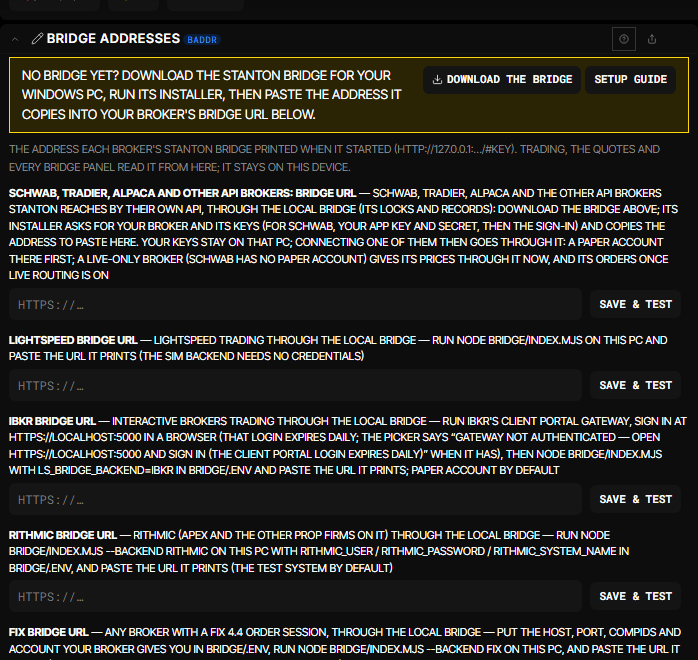
- In Terminal, open the Bridge tab, then Bridge addresses, and press Download the bridge (about 48 MB; everything it needs is inside, so nothing else is installed).
- Unzip it and double-click Install Stanton Bridge.cmd. If Windows says it protected your PC, press More info, then Run anyway.
- Answer its questions: the broker (type
schwab), the email you sign in to Terminal with, then your App Key and your Secret.
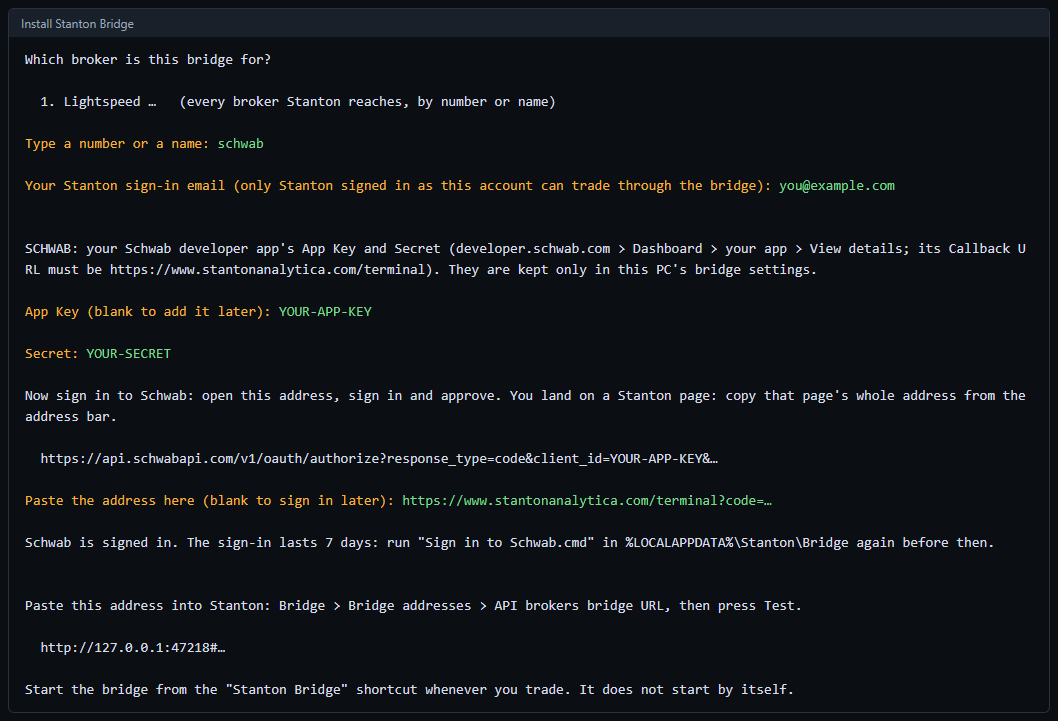
3. Sign in to Schwab
- The installer shows a Schwab link and puts it on your clipboard. Open it in your browser.
- Log in with your normal Schwab brokerage login and approve.
- You land on a Terminal page. Copy that page's whole address from the address bar, paste it into the installer window straight away (the code in it only lasts a short while), and press Enter. It says Schwab is signed in.
4. Connect Terminal
- At the end the installer copies the bridge's address (it starts with
http://127.0.0.1:). - In Terminal: Bridge › Bridge addresses › Schwab, Tradier, Alpaca and other API brokers: bridge URL, the first box. Paste it and press Save & test.
- Start the bridge from the Stanton Bridge shortcut on your Desktop whenever you use Terminal; it never starts by itself. Prices and charts then say Schwab.
Every 7 days
Schwab's sign-in lasts 7 days. Before it runs out, double-click Sign in to Schwab.cmd in
%LOCALAPPDATA%\Stanton\Bridge and do step 3 again.
If it says…
- “Signed in to Schwab for prices and charts only”: that is right for a Market Data app. Trading needs Accounts and Trading Production added to the app.
- “Schwab rejected the sign-in”: the 7 days ran out, or the address was pasted too late. Run Sign in to Schwab.cmd again.
- No Schwab prices: check that the bridge window is open and that Bridge addresses says the test passed.
Status
- The website checking
- Sign-in and sync checking
- Live prices checking
Known problems
None right now. When something breaks that these checks can't see, we write it here.
If something's wrong and it isn't listed here, email tate@stantonanalytica.com.
Contact
If you write about a specific trade or account, paste what we need into the email. With a passphrase set, your synced book is encrypted end to end, so we could not read it if we tried.
Pricing and plans
Three paid plans, and no free one once the beta ends. Every one of them exports your book any time.
Paid plans open after the beta. Everything below is free to every beta account today, and nothing takes a card.
Beta
Everything in Pro, free while Terminal is in beta.
- Everything in Pro
- No card, nothing to cancel
- Your feedback shapes what ships next
Trader
The whole terminal: journal, analytics, risk and charts.
- Unlimited trade journal
- Trade tagging
- Performance and journal analytics
- Risk management
- Advanced charts and visualizations
- Custom reports and filtering
- Rules and playbook tracking
- Live prices through your own broker
Pro RECOMMENDED
Everything, plus the professional workflow.
- Everything in Trader
- Multiple accounts
- Advanced market tools
- Advanced alerts
- API and export
- Priority support
- Live prices from Stanton when they launch
Cancel whenever you like once paid plans open. A promo code is entered when you finish setting up from your invite email — not on this page, because a code is redeemed against an account and there is no account yet at this point. No invite yet? Request access.
Loading…